Dual-Subnet Design
The lab uses two separate networks to simulate a realistic enterprise environment with network segmentation.
Network Map
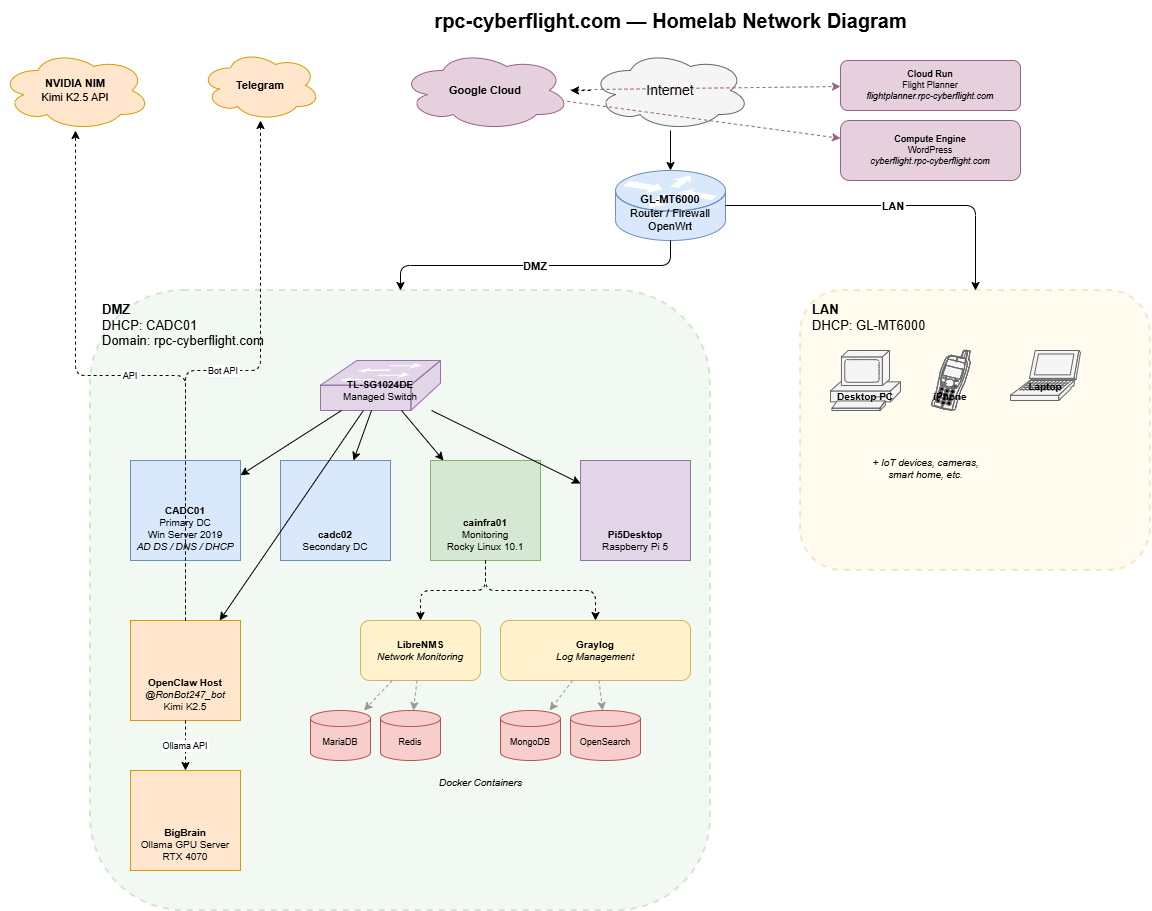
Subnets
| Network | Subnet | Purpose | Gateway | DHCP |
|---|---|---|---|---|
| LAN | 192.168.x.x/24 | Home devices — PCs, phones, IoT | GL-MT6000 (192.168.x.x) | Router (100–250, 12h lease) |
| DMZ | 192.168.x.x/24 | Lab servers and infrastructure | GL-MT6000 (192.168.x.x) | CADC01 (100–200, 8h lease) |
Why Two Networks?
Separating home devices from lab infrastructure mirrors how enterprises segment trusted and untrusted zones. The DMZ hosts all servers and services. The LAN is for daily use. The router bridges them with firewall rules controlling traffic flow.
Router — GL-MT6000
- OS: OpenWrt (Linux 5.4, aarch64)
- Interfaces: LAN (192.168.x.x), DMZ (192.168.x.x), WAN
- DNS Stack: AdGuardHome (port 3053) intercepts all DNS via iptables redirect. Dnsmasq runs on port 53 but is bypassed.
- Upstream DNS: 8.8.8.8, 9.9.9.9 (via AdGuardHome)
- Conditional Forward:
rpc-cyberflight.comqueries route to CADC01 (192.168.x.x) for internal DNS resolution - VPN: WireGuard tunnel for remote access
DNS Flow
Client query → iptables REDIRECT → AdGuardHome (:3053)
  ├── rpc-cyberflight.com → CADC01 (192.168.x.x)
  └── everything else → 8.8.8.8 / 9.9.9.9
This is important: if you only configure dnsmasq, your DNS changes won’t take effect because AdGuardHome intercepts first.
DMZ Switch — TP-Link TL-SG1024DE
- IP: 192.168.x.x
- Type: 24-port managed gigabit switch
- Role: Connects all DMZ devices (Proxmox nodes, VMs via bridge)
Key Design Decisions
| Decision | Rationale |
|---|---|
| Separate DMZ subnet | Isolates lab traffic from home devices; mirrors enterprise segmentation |
| AD-managed DHCP in DMZ | Centralizes IP management; supports DNS dynamic updates |
| AdGuardHome on router | Ad blocking + DNS filtering for all home devices |
| Conditional DNS forward | Lab domains resolve internally without changing client DNS settings |
| WireGuard VPN | Secure remote access to DMZ from anywhere |
| SNMPv3 for Linux/Proxmox | Encrypted monitoring; SNMPv2c only where v3 isn’t supported (Windows, OpenWrt) |
DHCP Reservations
All servers and infrastructure devices have static DHCP reservations on CADC01:
| Device | IP | Purpose |
|---|---|---|
| cainfra01 | 192.168.x.x | Monitoring/infrastructure server |
| TL-SG1024DE | 192.168.x.x | Managed switch |
| cadc02 | 192.168.x.x | Secondary domain controller |
| Pi5Desktop | 192.168.x.x | Raspberry Pi 5 |
What You Learn Building This
- Network segmentation — VLANs/subnets, firewall zones, traffic control
- DNS architecture — authoritative zones, conditional forwarding, split DNS
- DHCP management — scopes, reservations, exclusions, lease management
- Router configuration — OpenWrt, iptables, dnsmasq, AdGuardHome
- VPN setup — WireGuard tunnel configuration
- SNMP monitoring — v2c vs v3, security tradeoffs, extend scripts